Showing posts with label knight rider conversions. Show all posts

Monday, October 12, 2015

SFX Module Installation

I have a few of the SFX wired up in the car like the Turboboost sound, K.I.T.T.s introduction and the two Knight Rider themes (Narrated and Un-Narrated). The Turboboost SFX is connected to my switch pods Turboboost button and the other two or I should say 3 SFX are connected to my Space Matt buttons. The two Knight Rider themes are on the same SFX pin on the Adafruit board so they are hooked up to one button.

After hooking up those few SFX out in the car and giving it a test I did notice something unusual that happens, the SFX all play fine when the buttons are pressed but while the SFX is playing if you hit another button the SFX stops or seems to reset, which is odd considering I have not yet connected up the reset pin wire. I have a hunch that I may need to add in some rectifier diodes into my wiring scheme and see if that cures the issue. I think my SFX module might be getting some kind of signal backwash from the other buttons so I'm hoping that the diodes should correct that. I'll do some experimenting today and see. lol it's funny how things work awesome on the bench until you actually install it into the car along with all the other electronics and then discover annoying little issues like this ;)

Saturday, July 25, 2015

Lower Console Switch Lights As Part Of Dash Start Up Sequence


OK, here is a solution to something that has been kind of on my mind for a little while now....
So the Lower Console's button and switch lights are on all the time currently even if the ignition is off.... not good I know, bad, bad, bad... as these are not LED lights in this buttons and switches and given enough time would drain the battery for sure. So last night I had a thought pop into my head as I learn more and more about what many of the electronics components are capable of... my idea was this:

"Why not run a small 22 AWG wire from the last top countdown indicator on the top of the dash and run that to the base of a Transistor to activate a Relay that would turn on my Lower Console Switch and buttons lights?

That way when the dash did it's startup sequence, upon the lighting of the very last indicator a signal could be sent to activate my Lower Console lights."

Very simple I thought, so I got into a great conversation with Andrea lannaccone on Face Book this morning and we hashed out this wiring scheme. NOT using a Transistor as I had originally imagined but instead using an Optocoupler. Hey whatever works and is simple I always say ;)

You can see in the middle section of our diagram how we have introduced the wiring of the last countdown indicator LED to the Optocoupler which in turn triggers the SPST Relay which sends power to the Lower Console's switch lights making it an interactive part of the Dash start up sequence.... should be pretty cool when wired up and tested out ;)

Friday, July 24, 2015

Adafruit Mini Sound FX Board Wiring Diagram


I have worked out a wiring scheme (above) for the mini Adafruit 2MB Sound FX Board for supplying power to the board, wiring up the momentary buttons that activate the sound FX on the board and the audio out jack.

The power supply is simple, I'm basically using the same 12V to 5V step-down converter (right) or transformer model that I used for my GPS screen, I solder the 5V output wires onto the Adafruit board. I may introduce an on/off switch into the wiring scheme to have further control over if the board is powered or not. If I do I'll probably do that on the 12V input side of the step-down converter module. A simple switch to Relay should work well for that.
The momentary buttons to activate the various sound FX on the Adafruit board I will hook up to both my Lower Console's Space Matt buttons and my Switch Pod buttons. So far on the sound FX board I have:
  1. Knight Rider Theme (Narrated)
  2. Knight Rider Theme (Un-Narrated)
  3. File Open Sound FX
  4. File Close Sound FX
  5. Scanner Sound (Loop)
  6. Radar Sound (Loop)
  7. Turboboost
  8. K.I.T.T. Introduction
  9. Surveillance Mode FX
I have a little room to add more if I like but I think for anything more complex I will get the 16MB version of the same board in order to use more sound if I find I need more. But for now these should do for simple things.
The Knight Rider themes I have set on the board to play in next order so when you press the button the first theme plays and at the end of the theme when you press the button again the other version of the them plays.
The File Open sound FX I have sent to just play when the button is pressed, my thought is that I will have those sounds play when I turn on the LCD Screen or GPS Screen.
File Close sound FX will play when I turn off either monitor.
Scanner sound FX loop I have set as a "Latching" function on the Adafruit board, the sound plays until the button is pressed again, so looping sounds are best for the boards "Latching" function.
Same set up for the Radar and Surveillance sound FX loops. 
Turboboost FX is set as just a single play on button press same as K.I.T.T.s introduction. I could very easily add other introductions and have those play in a random order as the Adafruit sound FX board has a very nice feature for playing random sound files too, but for now I'm just using the classic K.I.T.T. introduction ;)

Here is a little additional work done on the diagram to include a power on off switch and to use the option of either a Relay or Optocoupler as switch option for the momentary button to activate the board sounds.


Monday, July 20, 2015

OEM Dash Center Air Vent Modifications


I had been sort of wondering for some time what to do about redirecting the airflow from the vent located in the middle of the stock OEM dash. I figured since I had that cover plate I had made out of Lexan plastic to help separate and protect the backs of the Knight Rider dash circuit boards from coming into contact with a bunch of loose flying wires I would see about somehow giving it another job as well, like attaching some sort of vent to allow the air to from through that vent opening in the OEM dash and more out from under the dash.

So what I came up with was to first make a rectangular box made from some high density foam rubber I picked up from a Craft store (Micheal's). I used black Gorilla Tape to hold the shape of the foam box together and then inserted it into the OEM dash vent opening. (above left). It's a snug fit and friction alone seems to keep it securely in place although I could glue it in with some contact cement if I find I need too. This box brings the vent opening up close to the back over my Lexan plastic cover plate.

I then cut out a square shaped hole in the Lexan plastic cover plate over the area of where the air vent matches up with the plate. I was looking for some sort of pre-made vent covering that I could use on the front part of my cover plate to redirect the air flow downwards but was not having a lot of luck, I did manage to find a small plastic tray from Dollarama for a buck that I could cut off one side that would pretty much do the trick (above right). I secured that to the front of my cover plate with 3 small bolts and some washers (left).

I'm not yet ready to secure the cover plate into place yet as I am still doing a fair bit of electrical wiring work in that area of the dash but when I am finished the cover plate will be secured into place and should serve the double purpose of protecting my wires from coming into contact with the back of my Knight Rider dash circuit boards and provide a nice opening to allow the airflow from the middle vent to flow downwards out under the dash.


Sunday, July 12, 2015

Headlights Switch Relocation

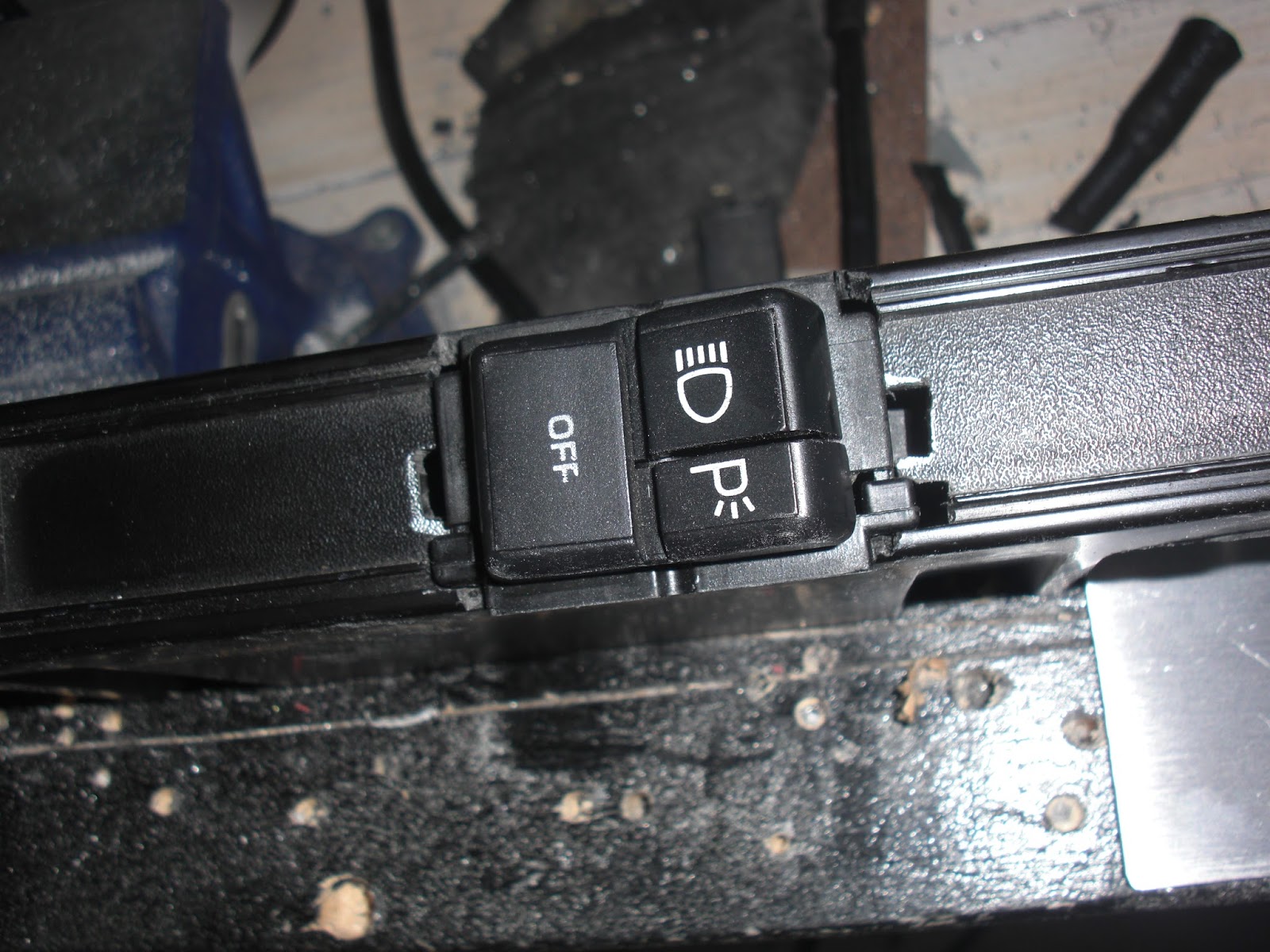
 I relocated my Headlights and Parking Lights switch onto that piece of Dash Trim that fit along the lower part of the stock OEM dash just below where the Gauge Cluster used to be. I had to do some cotton and modifying of the plastic part to make it fit into the space with my wire looms but got it to eventually fit in there nicely again. The next step was to make an aluminum bezel to fit over the Headlights switch. I cut out a piece of aluminum and cut out a hole the same size and shape of the hole that was in the stock OEM bezel that held both the Headlights and Dash illumination dimmer switches. I sanded it down (top left) and then marked where I would need to bend it (top right). If you have a "Metal Break" bending the aluminum is easy if not you can do what I did and use a Vice and a hammer.

I then cut out a hole in the plastic dash trim (left) big enough for the Headlights Switch and then fit the switch into place (right). I put the plug back on the end and test fit the whole thing back into the dash. I had to use my Dremel to do a little cutting in the stock OEM dash to make the plug fit into the space better because it's a big fat beast of a plug but with a little cutting work it can be made to fit nicely to the hole. I fed the wires from the plug in through the hole and down in through the underside of the dash, that way I can solder them the the other wires I have going into the wires that came out of the area of the stock OEM dash that the original plug was attached too. Basically all I am doing is extending the wires and relocating the switch to somewhere more convenient.

After bending the aluminum bezel into the right shape I fit it into place over the Headlights switch (left) and drilled in four holes to screw it onto the dash trim with. Next I sanded down the aluminum bezel one last time before giving it a good cleaning before painting it (right).

Once the paint was dry after baking in the hot sun for a few hours (left) I then attached the bezel to the plastic trim with four small black screws (right). With that job finally done the last thing to do was to attach the whole assembly onto the stock OEM dash and give the Headlights a test, something I was pretty sure I had never done since the car arrived almost two years ago. WOW! two years ago!! It's sometimes so surreal thinking about that, the time has gone by so fast and so much has been done on my K.I.T.T. Project.

Here is the final assembly in place, it's not screwed in yet as I have a lot more mucking about to do with wiring and such but it's in place and has been tested out, check out the two videos in my previous postings to see how that turned out. ;)


Friday, June 26, 2015

Upper Console Update


I marked and cut out my holes into the Upper Console with my Dremel tool. Each hole cut to fit each of my five DPDT lighted rocker switches. I was toying with the idea of making an aluminum plate with the holes for the switches cut into it but the rockers have their own plastic bezels so I figure this should be good enough. I then inserted the switches into the holes and snapped them into place. Next step will be to wire them up. I am going to wire these in a way that they will be lighted only when turned on.


Wednesday, June 24, 2015

Cowl Induction Hood Modification

I cleaned up the solenoid and actuator arm that controls the air flow flap as it had a little bit of surface rust on it. I cleaned off all of the rust with a gel rust remover, cleaned it up and then painted it black. Left the parts to dry overnight before re-assembling it back together.


Next step was to make some sort of bracket or mount that will hold the lights and allow air to flow freely into the opening. I made this bracket out of some stock aluminum that you can get from the metal centre of most hardware stores. I cut it to fit inside of the air induction unit and cut tabs to mount my light on.

The basic idea here is to do something very similar to what this other Knight Rider car builder has done with his air induction unit. I have added an extra tab that I figure will be a great place to put my "Check Engine" light at the far right of the mounting bracket.


Wednesday, May 27, 2015

Modifications to the Front Ground Effects

I figured now was as good as any time to do something with my Front Ground Effects, they had been kind of just hanging loose for the better part of over a year after I had installed my Knight Rider Front Nose. At first I was not really sure what to do with them and I was not finding a lot of information out there as to what other people within the Knight Rider Community were doing with theirs. Although about a week ago I did see one fellow on Face Book post what he had done which involved doing some modifications to the Front Nose fibreglass itself. I was not sure I wanted to go quite that far as from what I could see from looking at the underside of my car that it looked like just making a few modifications the the Ground Effects themselves with my Dremel tool would be the simpler solution. So after much "humming & hawing" about what to do I decided to go with this idea.

First thing to do was jack up the car so I can get my tools under there to work. Now on the inside of the Ground Effects there is a ridge of plastic that needed to be trimmed off so that the Ground Effects panel would fit more flush with the bottom part of the Knight Rider Front Nose. I used my Dremel tool to trim off the ridge of plastic area I have circled in the the image on the right.


Now on the outer most edge of the Ground Effects panels you'll see another ridge of plastic that also needs to be trimmed off. If you press the Ground Effects up close to the bottom of the Knight Rider Front Nose you'll see exactly where to trim in order to make them fit flush with the bottom of the Front Nose. You can see I have also used Trim Fasteners to secure them to the Front Nose. I needed to use my Step Drill bit to widen out the holes in the Ground Effects for the Trim Fasteners and then use a drill bit to drill holes into the bottom of the Front Nose big enough for them to fit snugly into. Like I say I'm not sure if this is how a lot of people do it but this is just what I did in order to get my Front Ground Effects to fit onto my Knight Rider Front Nose.

Friday, May 22, 2015

Rear Hatch Popper Button Relocation

Yesterday I took on the job of relocating my Rear Hatch Popper switch to somewhere a lot more accessible. One of the Switch Pod buttons seemed a logical choice. I decided to use the Switch Pod button on the Drivers window side of the Pod bottom right side button. (left)

The original location for the Rear Hatch Popper was located just above the car stereo next to the AC and Heater buttons. You can see a good example of this in this shot taken very early on last year near the beginning of my K.I.T.T. build. (right) With the Knight Rider dash design this area although not impossible is a little more difficult to get to. So my guess is that a lot of what is there will get relocated or hooked up to some sort of remote access. For now my Rear Hatch was my main concern as with the Taillight Blackouts I got from Knight Designs there is no key access anymore, K.I.T.T. does not have one. So in my case I was able to use the remote solenoid that was hooked up to the button under the dash.

In order to make this work I needed too take out the Rear Hatch button from the stock OEM dash and do a little work on it. I could have simply removed the button and used a couple of spade connectors with wires soldered onto them but I liked the idea of still having the original switch in place as a backup. So I drilled a couple of small holes into each of the switch pins near the base of the switch in order to thread my wires through. I then soldered on the wires to each of the pins and then drilled a couple of holes into the plastic ridge around the switch base. I then thread each of the wires through these holes, this way when the switch gets put back in the wires will not be "pinched."

I then wired the two switch wires I soldered onto the pins up to the Switch pins of a small NAIS SPST Relay that I installed into my Relay board under the stock OEM dash where the original gauge cluster used to sit. (right) This Relay was hooked up to to the Switch Pod Button which uses a positive pulse for the Relay as the ground connection is made on the Switch Pod Switch Side.

Now from what I understand the stock OEM Rear Hatch Popper switch already has a Relay in behind the dash so I may not have even need the Relay but when in doubt, I use one as it's sure not going to hurt, so basically I probably have one Relay on the Switch Pod activating the Relay for the Rear Hatch Popper, kinda funny but no big deal. It works very well as you can see in my Video from my last post ;)

Friday, May 15, 2015

Lexan Dash Relays Area Cover Plate

I made a Lexan plastic cover plate to be mounted onto the stock OEM dash around my relays area. This will help tuck in the wires and help shield them. I still need to paint this so it's in for just a test fitting for now while I figured out where to mount my aluminum "L" brackets and where best to secure it in with screws. I have small rectangular holes cut and filed out of the Lexan plastic cover plate to allow access to the heating, air conditioning buttons and the rear hatch popper. I think a lot of people who built these knight Rider replicas relocate those switches to somewhere more convenient. I may very well do the same thing, but for now this is a good way I figure to secure in some wires and help kind of panel off the underside of the Knight Rider dash a fair bit. This way it might make adding other goodies into those areas easier as they will have something more to be able to be mounted too. Just a thought anyways.

Tuesday, May 5, 2015

Installing My Custom Speaker Grill Cover Plates


This morning I installed my custom speaker grill cover plates I had made out of some Lexan plastic I had on hand. I let the paint dry over night and gave them a bit of a wet sanding in the morning, cleaned them up and painted them again. Now they are installed into my Knight Rider 2 TV Dash. They may not be as perfect as if they were store bought but not bad at all for hand crafted, I'm happy with them. Now comes the age old question "To paint the screw heads or not paint the screw heads?"


On one hand I kind of like that little bit of silver but I also would not mind if they blended in too. Decisions, decisions. lol Anyways I'm happy that little job turned out.

On another note though it turns out that my dummy row closes to the monitors has a bad board, maybe a chip so Knight Rider World is going to replace the board for me. I'm surprised I never noticed before but after reviewing my very fist start up test of the dash it had always been like that so I know it's not something that just kind of happened. Just as well I have the dash out to put my custom speaker grill cover plates in and to do a little trimming on the drivers side of the dash mounting wing. Might as well pull that bad board and ship it back to K.R.W.


Sunday, May 3, 2015

Third Dash Test Fitting


Another test fitting today of my Knight Rider 2 TV Dash after trimming a little bit off of the drivers side mounting wing on the dash and sticking down the pipe insulation I ran across the front of the stock OEM dash. I drilled in a few holes and Zip-Tied down the pipe insulation to the OEM dash just to be doubly sure it not going anywhere. After letting the 3M glue dry overnight I also removed the masking tape from around the steering column that I had glued on a piece of the pipe insulation and a piece of high density foam rubber to help raise up the front of the Switch Pods to match the Gull-wing a lot better. I put the dash in for another test fitting and it's definitely fitting better after those tweaks. I think I can still trim a little more off of the mounting wing on the drivers side but I would not take off too much more though as it's fitting pretty good now. Although I did try and put my windshield side moulding back on the window column to see if that would fit, it doesn't so I'm not sure what others have done to rectify that. I do know now that I don't need so many power wires going up to the Upper Console when I can get away with either a 16 or 10 AWG wire to feed power to the upper console. This would minimize the amount of wires I currently have running up both sides of the window column. I can then run that power wire to my fuse block I have installed on the passenger side hush panel. That way both the Upper and Lower consoles will get their power from that block.


My next job for today was to work out what to do with my speaker grills. Fortunately I had gotten some from the red parts car I had which is great because my car for some reason did not have any installed into the stock OEM Dash Pad. Now because my speakers kind of stick up a little this was going to be a little more tricky than I originally thought it was. My initial plan was to try ands see if I could somehow mount the speaker grills in under the Knight Rider Dash but due to the lack of space I figured I would need to modify them to fit into the recessed areas in the Knight Rider Dash made for the speakers. As you can see in the samples (above left & right) I have cut the passenger side speaker grill to fit nicely into the recessed speaker holes in the fibreglass dash. I'll do the same to the other side taking into account that it is shaped a little different because it is pretty close to the Countdown Indicators channel.

Here you can probably see the difference in the shape of the speaker recess area on the drivers side. It's kind of notched out a bit to accommodate the Countdown Indicators area so I will need to reflect that change in the speaker grill for this side. I'll most likely trace out the other one on a piece of cardboard and make the change to it and gets fit it in and then cut out the speaker grill to match.
Once they fit nice I'll cut out a recessed area in the "Slats" of the speaker grills to allow for a countersunk screw in a few areas and then secure the speaker grills to the Knight Rider Dash. I'll probably clean them up and repaint them too before securing them in just so they will look a lot nicer.


2 TV Dash Installation Tweaks


After a lot of experimenting with ways to get the Knight Rider 2 TV Dash to fit perfectly I think I have a pretty good handle on it. Yesterday I tried this option using a long piece of foam pipe insulation I had kicking around. This is a 2" diameter split pipe insulation I got from Home Depot. For my test fitting I just simply taped it into position while I test fitted the dash again.

I noticed that with the pipe insulation in under the front of the dash that it raised up the front of the dash enough that turning the key in the ignition is much easier, it still rubs a little but my dash can also still go up another 1/4 inch approximately to light up the top of the Gull-Wing with the top of the Switch Pods this extra room should make the Ignition Key Collar clear the top part of the dash. I have even been informed that you can trim off the top part of the Ignition Key Collar that interferes with the dash if needed. I'll only resort to that if absolutely necessary.

I took two "Rubber Cups" square rubber blocks you can get from Canadian Tire or most furniture stores so as your furniture legs don't mark up your floors, I placed them close to the passenger side under the foam pipe insulation to give that part of the dash a little more height as it looked like it needed levelling up a bit to match my Switch Pods.


The drivers side of the dash needs to be pushed in more but I was noticing the the side mounting "Wing" was butting right up against the stock OEM dash so I needed to trim off a little of that. I figure about a good half inch by the looks of the picture (above right). So I trimmed of a little less than that to try it out and see if it makes a difference, if it does I'll file off a little more. I basically want to try and get the part of the dash that fits up close to the windshield in under that black masking or whatever it is that goes around the outer edge of the windshield. I think that is how it's supposed to fit.


Here are a few shots of yesterdays dash test fitting, it's really starting to come together and look really good. I still have a few minor tweaks to do like see how it looks now that I had put the "Rubber Cups" in under the pipe insulation close to the passenger side and see if that levelled out the dash that extra bit for the Switch Pods.

I also put a piece of foam pipe insulation over top of the steering wheel column and glued on a piece of high density foam rubber on top of that to help raise up the front part of the Switch Pods to help clear the top of the Ignition Key Collar.

I'll be doing another test fitting to see how those tweaks look today. I had to leave my foam pipe insulation over night to let the 3M glue set that I stuck it down to the stock OEM dash with so today it should be fine for me to go ahead and see how my tweaks will work out. I also hooked up the Voice Box yesterday for a test, first time I have ever done that. If you watched my latest video you'll see that is working really well. K.I.T.T. is REALLY starting to come to life. :)